

Projects
2026
2023

Amateur Radio
Notes on getting back into amateur radio, keeping track of licences and station ideas.
2022

Opinionated Router Benchmark
My home Internet connection is a VDSL/FTTC (fibre to the cabinet) which comes over the telephone line into a BT master socket which has an ADSL filter and requires a modem. The modems are now usually built into the BT Home/Smart Hub CPE (Customer-premises equipment) but I still use a Huawei HG612 standalone modem as I don’t particularly like the CPE I was given. So I need a router to talk PPPoE to the modem and also firewall, route and NAT my home lan traffic to the Internet. I used a pair of Linksys WRT3200ACM devices: one as a router and wireless access point and the other as just a wireless access point. However while I was quite happy with them, the overall experience was not great: Ring devices would not connect, Tapo devices would not upgrade firmware and the overall signal quality around the house was not very good. So I upgraded to some Aruba Mesh wireless access points, which turned out to be great. However this left most of the functionality of the WRT3200ACM unneeded in what is quite a large physical footprint, also I don’t want to overload the device by turning my internet router into a NAS. Thus I needed to find a replacement device that just does the routing. Also with the new access points I also changed to a managed network switches with vlans to allow guest wifi, an untrusted iot network, etc. Thus the new device could just be a single port router on a stick with a single trunk link.
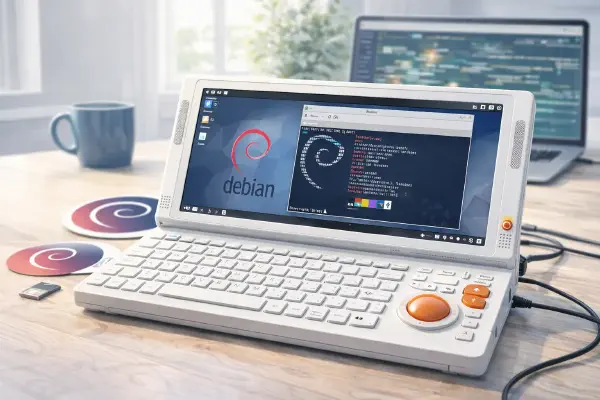
Debian on Devterm R-01
I recently found out about DevTerm Kit R-01 via Bryan Lunduke. I’ve been interested in RISC V for ages and so far have resisted buying any dev boards as they would just sit in boxes. However because this is an entire portable computer it’s a great way to play, there is hope it can become a useful piece of kit, so I immediately decided to get one.
2020
IMDB Age
IMDB Age is a Greasemonkey script that I wrote to add age and other various info onto IMDB pages.
2018
Raspberry Pi Temperature Monitor
Introduction # I recently needed to monitor temperature, log it, and alert on high readings. I had a look in my parts bin and I found a Raspberry Pi, a 1-Wire HBA, a 1-Wire temperature IC and a 3G dongle.
2017
Raspberry Pi Tape Remote (RPTR)
Introduction # I have known about reel to reel tape for some time, my Dad has an old 1960’s player in the attic. However it is only relatively recently that I found out that there are some people that still use them for music listening purposes. I think my first real exposure was on the Techmoan YouTube channel, I saw a video about Tips and advice for the Reel-to-Reel buying newbie. Instantly I decided it was a waste of time and money. However the more I thought about it the more I liked the idea of selecting an album or compilation of music, starting the tape and not being able to skip tracks easily. All while seeing the tape player play while listening to the music. The other appealing idea was the retro design and the look of 10 inch tape spools. I continued to think about reel to reel, secretly wanting a player. Till a friend reminded me that people generally spend far more on “ornaments” for their houses than the average cost of a working tape player. This changed my mind, I instantly did an ebay search and found a player that ticked every box: a direct drive so that no belts would need changing, a head that is not prone to wearing out, a model that takes 1/4 inch tape and 10 inch tape reels, touch buttons rather than large mechanical piano key controls, vu meters, a nice 80s black finish and most importantly in working order. To make it even better it was a buy it now auction that was in the neighbouring town. So I bid, won, paid and picked it up the same day!
Rubus (Raspberry Pi Cluster)
Background # There have been many Raspberry Pi clusters before, they first started when the Raspberry Pi came out first. They are all very cool and I’ve wanted to try to make my own, but never quite got round to it or could justify it or think of any good project to run on them. Around the time the Raspberry Pi 3 came out, I was deep into learning how OpenStack work. That is the stage after running packstack and playing, the stage of looking at all the components and how they all fit together. After a while I thought it would be really quite cool to run OpenStack on a Raspberry Pi Cluster. OpenStack is quite resource intensive, dozens of multi forking memory hungry (in Pi terms) Python daemons. So it would really need multiple Pi’s to run. However, given the whole point is to run instances, the Raspberry Pi is quite limited regarding actual virtualisation. However I didn’t let that stop me. I didn’t want to run any production instances, I just wanted to learn.
2016
OpenStack proof of concept
Introduction # This is a short howto on creating a small OpenStack proof of concept on CentOS. The aim is to create a proof of concept OpenStack Liberty deployment on a single Linux testing machine, where the deployment matches real world hardware deployments. The aim is not to just install all the OpenStack components in a single machine or virtual machine. The aim is to make use of Linux, KVM and libvirt to create virtual hardware to run the various OpenStack components to match a real world deployment. Each virtual machine represents what could be a physical host. It will use CentOS 7 as the base operating system and use the RDO OpenStack packages. This matches the Red Hat OpenStack Platform, however does not need subscriptions to install and test.
2015
WD Sharespace Debootstrap
Intro # So I have an old Western Digital Sharespace NAS box that I used to use as my main home NAS. I’ve long since switched it off, support for it has more or less finished, there have been no updates in ages and the new WD support site does not list it anymore. That said it seems a shame to skip it so I tried a few times to re-purpose it. I did get root when I first got it, but was never able to do anything more as it had all my files on. After I stopped using it for a while I forgot about it. Some time later I found a few posts on the debian-arm mailing list from David Hicks, he had managed to get Debian installed at working! Yay I thought so I emailed him and he very helpfully gave me some instructions and some patches to get me started. Unfortunately I fell at the first hurdle and could not get the console working. Embarrassingly I had not turned flow control off within the minicom settings. After 18 months while working on a serial console for a Raspberry Pi it dawned on me that it was my mistake. So I got out the box and console cable and decided to have another go.
Raspberry Pi Router Benchmark
Introduction # My ISP doesn’t provide IPv6 and the wireless router they give out does not work with IPv6 Tunnels. So I set up a Raspberry Pi as a router on a stick to route IPv6 on my home network to my IPv6 tunnel provider over IPv4. I mostly did this to start getting familiar with IPv6; it does work and my home computers and phone get IPv6 addresses on the Internet. I occasionally do a netstat and see a bunch of tcp6 connections established to google, facebook and youtube. My one worry was the performance of the Raspberry Pi, it’s a single core Arm v6 running at 700Mhz with a 100M ethernet that sits on the USB bus. I have in the past noticed that when the Raspberry Pi is busy (mostly with cron) the ability for it to forward packets does slow down. Very occasionally it drops packets and makes the connection unusable for a short while. My internet connection is FTTC/fiber to the cabinet and +100M, so I’m already limiting my connection speed if they go over the Raspberry Pi. I always meant to run some benchmarks on the Pi to see just how fast it can ship packets. With the advent of the newer Raspberry Pi 2 with its quad Core Arm v8 running at 900Mhz I decided to do some proper testing.
2013
Essential Films
Here are my essential films. It’s somewhere between my favourite films and a list of films that must be seen. It’s in alphabetical order and I was originally aiming for the 50 mark, however there are too many good films so the current count is 83. The main table is generated from films.txt with getimdb.py (needs updating from MoinMoin to MD syntax). I’ve also cross-referenced this list with the Bechdel Test Movie List on a Essential Films Bechdel Test
Credit Card Exchange Rates
I have a Barclaycard credit card and a Halifax credit card. I recently decided to experiment to try to find out how much it costs to use them abroad to withdraw cash from an ATM. I might be crazy, but I wanted to know! Both cards have particular offers that mean you don’t get charged as much as most cards do to withdraw cash. I did a cash withdrawal of €50 from an ATM on both cards on the same day. Anyway, on with the results:
2011
Petrol Price
Petrol prices always seem to be in the news. This is mostly because it costs a lot of money and continues to increase all the time. Duty increases and VAT increases are both usually blamed. Also the price of crude oil is often blamed. This made me wonder if there was an actual correlation between crude oil and petrol at the pump. I did a little searching but did not find anything solid. In fact the graphs I did find were particularly bad, including one graph that plotted crude oil and petrol using different scales on the same graph. Some did produce vaguely interesting graphs but few provide their sources and none provided the raw source data.
Cineworld Scrape
I love going to the cinema. I usually go once a week to my local Cineworld multiplex. Their website has changed a few times over the years. Generally the changes have all been improvements and my local cinema listing is good. However all cinema websites I have found lack an important view on the listings data. That is a chronological order rather than a film title order. Why is this useful you ask? Well if I want to go to the cinema on a particular evening I really don’t care what other films are showing outside my allocated timeslot. I want to be able to easily see which films are going to start say between 7 and 8 that I have not already seen.
2009
Extra IDE
ExtraIDE is a patch to the Linux kernel to enable more than the standard 20 IDE disk drives in a Linux system, as each IDE controller that is driven by the old style drivers be it PATA or SATA (ie not libata). Each IDE channel takes up two drive slots and letters even if the physical card has only one sata disk per channel attached. This severely limits the total IDE disks in one system. This patch adds four extra major device numbers and the necessary bits to extend past ide[0-9] and hda[a-t] to ide[0-9a-d] and hda[a-zA]. The real fix is to improve the libata drivers to include support for my old broken controllers or upgrade to new sata controllers. In any case I have actually run with some form of this patch for the best part of 3 years. It was never really worth submitting to the main line, but I did post it to the LKML.
GPG Bench Cipher
I benchmarked a few of the gpg ciphers. I created a 1GB file from /dev/urandom with dd. Running “gpg –version” gives a list of available ciphers. I then ran “time cat test | gpg –symmetric –cipher-algo TWOFISH > test.enc” for each cipher to see how fast they all were. It’s not amazingly accurate but it gave a good indication which one to avoid! I ran this on my “Intel(R) Core(TM)2 CPU 6400 @ 2.13GHz”, 2.6.30 gives this 4256 bogomips for what it’s worth. Anyway, on with the results.
WD ShareSpace
(Update 01/09/2009 - All of the below is now not necessary as the latest firmware has an option from the web interface to turn on remote root ssh shell access, YAY for Western Digital!)
DDS Destruction
To see how hardy DDS tapes were, I decided to do some tests. I apologise for the image quality. Anyway, on with the show.